


Learn how to quickly identify and kill stuck Python or Node.js processes in cPanel to free up server resources and keep your applications running smoothly.
Why Would You Need to Kill a Process?
Sometimes, Python or Node.js applications can become unresponsive, consume excessive resources, or fail to terminate properly. When this happens, you may need to manually stop these processes in cPanel to:
✔ Free up server memory & CPU
✔ Resolve application crashes
✔ Restart failed services
✔ Prevent server slowdowns
Steps to Check and Kill Processes via cPanel Terminal
-
Log in to cPanel.
-
Go to the "Advanced" section and locate "Terminal."
Note: If you cannot find this feature, contact support and request to enable Terminal in your cPanel.
-
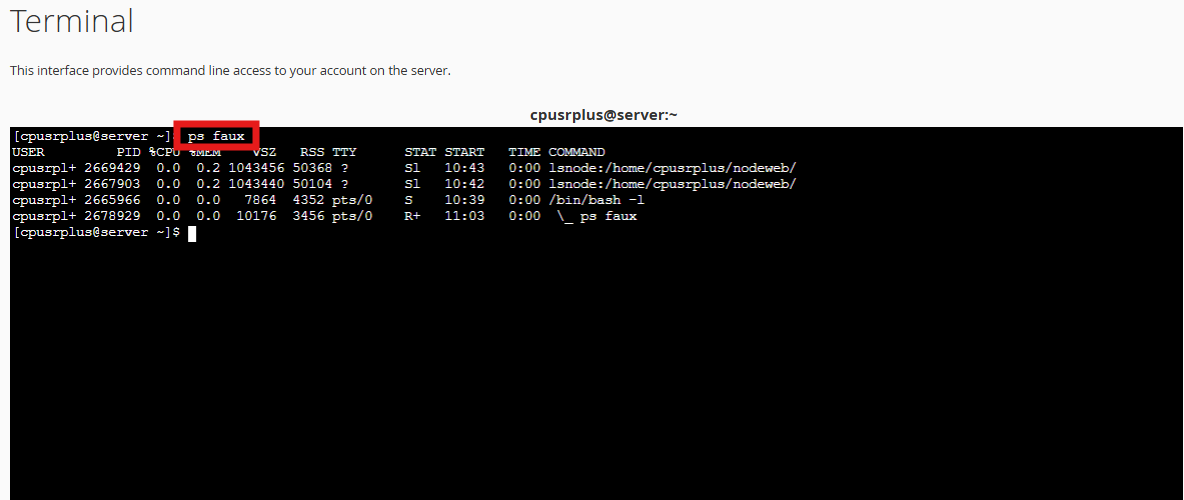
List all running processes by typing:
ps faux
Output.
How to Kill All Python or Node.js Processes in cPanel
Terminating Python Processes
To kill all processes associated with Python, run the following command:
kill -9 $(ps faux | grep python | grep -v grep | awk '{print $2}')
Terminating Node.js Processes
To kill all processes associated with Node.js, use this command:
kill -9 $(ps faux | grep node | grep -v grep | awk '{print $2}')
After running ps faux again, you should no longer see the Python or Node.js processes running.
Alternative
For Python Processes:
pkill -f python
(or pkill -f python3 for Python 3)
For Node.js Processes:
pkill -f node
Command Breakdown
This command performs the following steps:
-
ps faux– Lists all running processes in a tree format. -
grep python/node– Filters processes containing "python" or "node." -
grep -v grep– Excludes thegrepcommand itself from results. -
awk '{print $2}'– Extracts the Process IDs (PIDs) from the output. -
kill -9 $(...)– Forcefully terminates the listed PIDs. pkillterminates running processes by name (instead of manually finding and killing them by PID).
Automating with a Cron Job
To automatically kill Python processes every 30 minutes, add this to your crontab:
*/30 * * * * kill -9 $(ps faux | grep python | grep -v grep | awk '{print $2}')
⚠️ Caution:
-
Only use
kill -9if processes are unresponsive (normal termination should usekill -15first). -
Improper cron job usage may disrupt critical services.
FAQs
Q: What if the process keeps reappearing?
A: It may be auto-started by a cron job or service. Check:
-
Cron jobs in cPanel
-
Startup scripts
Q: Will killing a process delete my data?
A: No, but unsaved work in the app may be lost.
Q: Can I automate process cleanup?
A: Yes! Use a bash script to monitor and kill high-resource processes.